


WordPress 后台「设置-阅读」里,“静态页面”首页只能从页面里挑,文章不在下拉列表里。其实通过过滤 wp_dropdown_pages 把这个下拉重建成包含所有已发布文章的选择器就能绕开限制,前后台再各补一个钩子。
代码
加到当前主题的 functions.php 里:
// 阅读设置主页显示可以选择文章
class CustomFrontPage {
	private static $instance;
	public static function get_instance() {
		return isset( self::$instance ) ? self::$instance : new self();
	}

	private function __construct() {
		self::$instance = $this;
		if ( is_admin() ) {
			add_filter( 'wp_dropdown_pages', array( $this, 'wp_dropdown_pages' ) );
		} else {
			add_action( 'pre_get_posts', array( $this, 'pre_get_posts' ) );
			add_action( 'template_redirect', array( $this, 'template_redirect' ) );
		}
	}

	public function wp_dropdown_pages( $output ) {
		global $pagenow;
		if ( ( 'options-reading.php' === $pagenow || 'customize.php' === $pagenow ) && preg_match( '#page_on_front#', $output ) ) {
			$output = $this->posts_dropdown();
		}

		return $output;
	}

	protected function posts_dropdown( $post_type = 'any' ) {
		$output = '';
		if ( 'any' !== $post_type && ! post_type_exists( $post_type ) ) {
			$post_type = 'page';
		}
		$posts = get_posts(
			array(
				'posts_per_page' => - 1,
				'orderby'        => 'title',
				'order'          => 'ASC',
				'post_type'      => $post_type,
				'post_status'    => 'publish',
			)
		);

		$front_page_id = get_option( 'page_on_front' );

		$select  = __( 'Select' );
		$output .= '<select name="page_on_front" id="page_on_front">';
		$output .= "<option value="0">— {$select} —</option>";
		foreach ( $posts as $post ) {
			$selected      = selected( $front_page_id, $post->ID, false );
			$post_type_obj = get_post_type_object( $post->post_type );

			$output .= "<option value="{$post->ID}"{$selected}>{$post->post_title} ({$post_type_obj->labels->singular_name})</option>";
		}
		$output .= '</select>';

		return $output;
	}

	public function pre_get_posts( $query ) {
		if ( $query->is_main_query() ) {
			$post_type = $query->get( 'post_type' );
			$page_id   = $query->get( 'page_id' );
			if ( empty( $post_type ) && ! empty( $page_id ) ) {
				$query->set( 'post_type', get_post_type( $page_id ) );
			}
		}
	}

	public function template_redirect() {
		global $post;
		if ( is_singular() && ! is_front_page() && absint( get_option( 'page_on_front' ) ) === $post->ID ) {
			wp_safe_redirect( site_url(), 301 );
		}
	}
}

CustomFrontPage::get_instance();
三部分逻辑:后台只在 options-reading.php 和 customize.php 且命中 page_on_front 时,用 posts_dropdown() 生成的文章列表替换原来的页面列表,按标题排序,并带上文章类型标注;前台 pre_get_posts 处理主查询,page_id 存在但没限类型时补上 post_type,保证被设为首页的文章能正常渲染;template_redirect 则在有人直接访问这篇文章自己的固定链接时 301 回站点根,避免同一内容两个地址重复收录。
怎么用
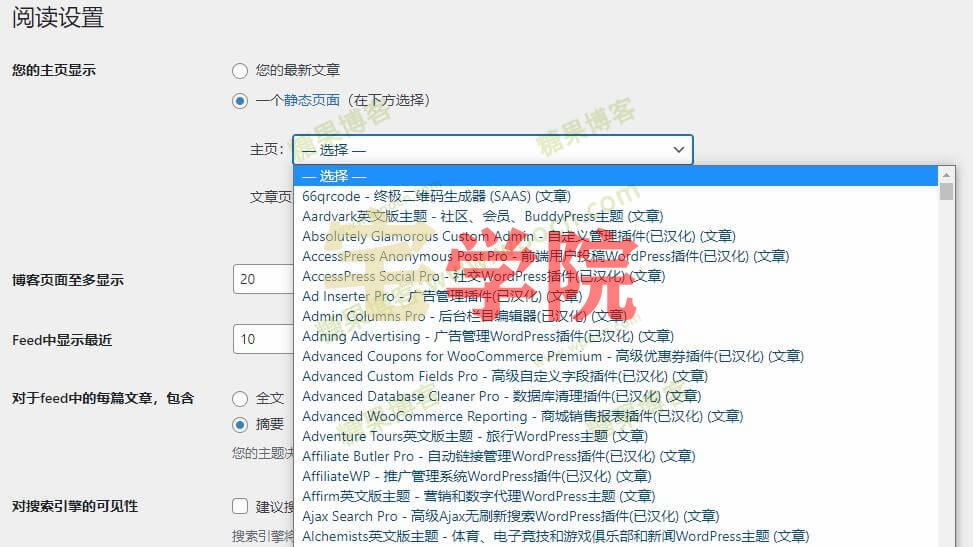
加完之后进 后台 → 设置 → 阅读 → “您的主页显示:一个静态页面”→ 主页,下拉列表里就能看到所有文章,选中一篇保存即可:
注意事项
改动写在主题函数文件里,换主题或主题更新就没了,想长期用建议打包成小插件。查询用的 posts_per_page => -1,站里文章数量很大时下拉会变得很重,可考虑只查指定类型或分页。最后那条 301 如果不想让文章原链接跳转,删掉 template_redirect 的挂接就行。
© 版权声明
文章版权归作者所有,未经允许请勿转载。
THE END













暂无评论内容