

OpenResty 是基于 nginx 的 Web 应用服务器,支持 Lua 脚本和第三方模块。在它前面挂一套 WAF,用 Lua 对进出流量做实时检测与拦截,成本很低,这篇文章记录 unixhot/waf 的部署过程和踩到的坑。
WAF 是干什么的
WAF(Web Application Firewall)部署在 Web 应用和客户端之间,靠规则、行为分析等手段检测并拦截常见攻击:SQL 注入、XSS、CSRF,恶意爬虫、扫描器、爆破工具这类自动化攻击,也能挡住身份证号、银行卡号等敏感信息外泄,对 DDoS 同样有缓解作用。命中预设规则后的动作可以是拦截、禁止访问、重定向。它通常部署在应用前端,可与 IDS、IPS 组合成完整防御体系,形态上有硬件、软件和云服务三种。
这套开源 WAF 的功能
项目地址:https://github.com/unixhot/waf。项目已经很久没人维护,基本功能仍可用:IP 黑白名单;URL 白名单;User-Agent 过滤;CC 防护(单 URL 在指定时间内的访问次数超限即返回 403);Cookie、URL、URL 参数过滤;所有拒绝动作记为 JSON 日志,方便接 ELK 做收集、存储、搜索和展示。
部署过程
1. 验证 OpenResty 的 Lua 可用
防 CC 依赖 Lua,先在配置里临时加一个返回 Lua 的 location:
[root@dqzboy ~]# vim /usr/local/openresty/nginx/conf/conf.d/default.conf
    #在server配置中增加如下规则
    location /hello {
        default_type text/html;
        content_by_lua_block {
            ngx.say("<p>hello, world</p>")
        }
    }
[root@dqzboy ~]# openresty -t
[root@dqzboy ~]# openresty -s reload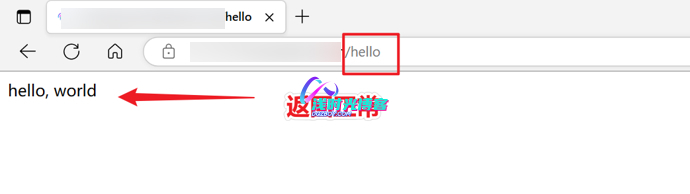
返回正常即可,测试用的 location 配置随后删掉。
2. 下载 WAF 并认识目录
[root@dqzboy ~]# git clone https://github.com/unixhot/waf.git
[root@dqzboy ~]# cp -a ./waf/waf /usr/local/openresty/nginx/conf/目录构成:access.lua、init.lua、lib.lua 是 waf 功能实现代码,config.lua 是配置文件,rule-config 存放防御规则。rule-config 里各文件对应一类策略:args.rule 异常 get 请求参数、blackip.rule IP 黑名单、cookie.rule Cookie、post.rule 异常 post 参数、url.rule 异常 url、useragent.rule 异常 UA、whiteip.rule IP 白名单、whiteurl.rule URL 白名单。
3. 修一个取真实 IP 的坑
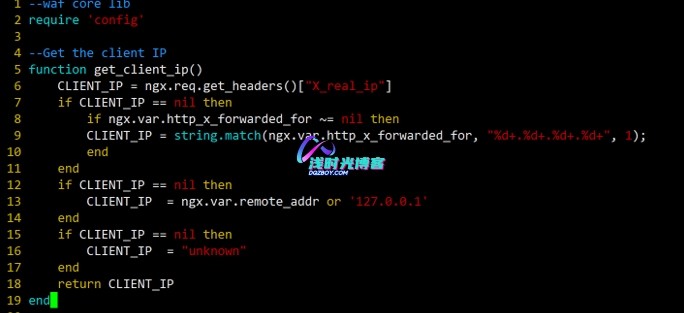
原代码在 /usr/local/openresty/nginx/conf/waf/lib.lua 里直接取 X_Forwarded_For;经过多个代理节点时这个头会带一串 IP,取到的就不是客户端真实地址。改成取列表里的第一个:
function get_client_ip()
    loacl CLIENT_IP = ngx.req.get_headers()["X_real_ip"]
    if CLIENT_IP == nil then
        if ngx.var.http_x_forwarded_for ~= nil then
        CLIENT_IP = string.match(ngx.var.http_x_forwarded_for, "%d+.%d+.%d+.%d+", 1);
        end
    end
    if CLIENT_IP == nil then
        CLIENT_IP  = ngx.var.remote_addr or '127.0.0.1'
    end
    if CLIENT_IP == nil then
        CLIENT_IP  = "unknown"
    end
    return CLIENT_IP
end
4. 配置 config.lua
开关、阈值、拦截动作等参数都在这个文件里:
--WAF config file,enable = "on",disable = "off"

--waf 开启与关闭
config_waf_enable = "on"
--log 日志目录;注意openresty运行用户需要有对应目录的权限,不然无法输出日志
config_log_dir = "/usr/local/openresty/nginx/logs/"
--WAF规则文件存储路径
config_rule_dir = "/usr/local/openresty/nginx/conf/waf/rule-config"
--是否开启 URL 白名单
config_white_url_check = "on"
--是否开启ip 白名单
config_white_ip_check = "on"
--是否开启ip 黑名单
config_black_ip_check = "on"
--启用/禁用URL过滤
config_url_check = "on"
--启用/禁用URL参数筛选
config_url_args_check = "on"
--启用/禁用用户代理筛选
config_user_agent_check = "on"
--是否拦截 cookie 攻击
config_cookie_check = "on"
--是否开启拦截 cc 攻击
config_cc_check = "on"
--设置cc攻击频率,单位为秒, 这里表示1分钟同一个IP只能请求同一个url地址20次,超过20次返回403;默认示例中为单个IP地址在60秒内访问同一个页面次数超过10次则认为是cc攻击,则自动禁止此IP地址访问此页面60秒,60秒后解封(封禁过程中此IP地址依然可以访问其它页面,如果同一个页面访问次数超过10次依然会被禁止)
config_cc_rate = "20/60"
--是否拦截 post 攻击
config_post_check = "on"
--对于违反规则的请求则跳转到一个自定义html页面还是指定页面,值为 html 和 redirect
config_waf_output = "html"
--指定违反请求后跳转的指定html页面
config_waf_redirect_url = "https://www.dqzboy.com"
config_output_html=[[
--指定违反规则后跳转的自定义html页面,页面输出警告内容,可在中括号内自定义;注意修改默认配置文件里的内容
<!DOCTYPE html>
<html>
<head>
    <meta charset="UTF-8">
    <title>浅时光云WAF防火墙</title>
    <link rel="icon" href="https://www.dqzboy.com/images/logo.png" type="image/x-icon"/>
    <style type="text/css">
        /* 背景图片 */
        body {
            background: url(https://www.dqzboy.com/images/waf.jpg);
            background-size: cover;
        }
        /* 外边框 */
        .container {
            margin: 100px auto;
            width: 500px;
            height: 700px;
            border-radius: 10px;
            border: 3px solid #FFF;
            background-color: rgba(255,255,255,0.8);
            box-shadow: 0 0 20px #000;
            padding: 20px;
            text-align: center;
            font-family: Arial, sans-serif;
        }
        /* 标题 */
        .title {
            font-size: 30px;
            font-weight: bold;
            margin-bottom: 20px;
            color: #333;
            text-shadow: 2px 2px #FFF;
        }
        /* 提示信息 */
        .info {
            margin-bottom: 30px;
            font-size: 18px;
            font-weight: bold;
            color: #333;
            text-shadow: 1px 1px #FFF;
        }
        /* 按钮 */
        .button {
            display: inline-block;
            margin-top: 30px;
            padding: 10px 30px;
            border-radius: 5px;
            border: none;
            background-color: #F44336;
            color: #FFF;
            font-size: 20px;
            font-weight: bold;
            cursor: pointer;
            text-shadow: 1px 1px #000;
        }
        /* 按钮悬停效果 */
        .button:hover {
            background-color: #D32F2F;
        }
        /* 客户端信息 */
        .client-info {
            margin-top: 50px;
            font-size: 20px;
            font-weight: bold;
            color: #333;
            text-shadow: 1px 1px #FFF;
        }
        /* 客户端IP */
        .client-ip {
            margin-top: 20px;
            font-size: 16px;
            color: #333;
            text-shadow: 1px 1px #FFF;
        }
        /* 客户端地区 */
        .client-region {
            margin-top: 10px;
            font-size: 16px;
            color: #333;
            text-shadow: 1px 1px #FFF;
        }
    </style>
</head>
<body>
    <div class="container">
        <div class="title">浅时光博客WAF防火墙</div>
        <div class="info">
            <p>抱歉,您的访问被拦截。</p>
            <p>我们检测到您的请求可能存在安全威胁。</p>
        </div>
        <button class="button" onclick="location.href='https://www.dqzboy.com'">返回主页</button>
        <div class="ip-container">
            <h2>请求信息</h2>
            <p>请求IP地址: <span id="ip-address">正在获取IP地址...</span></p>
            <p>请求地理位置: <span id="ip-location">正在获取地理位置...</span></p>
        </div>
        <script>
            var xhr = new XMLHttpRequest();
            xhr.open("GET", "https://api.ipify.org?format=json", true);
            xhr.onload = function () {
                if (xhr.status === 200) {
                    var data = JSON.parse(xhr.responseText);
                    var ip = data.ip;
                    document.getElementById("ip-address").innerHTML = "IP: " + ip;

                    // Get client location using IP
                    var xhr2 = new XMLHttpRequest();
                    xhr2.open("GET", "https://ipapi.co/" + ip + "/json/", true);
                    xhr2.onload = function () {
                        if (xhr2.status === 200) {
                            var locationData = JSON.parse(xhr2.responseText);
                            var region = locationData.region;
                            var city = locationData.city;
                            var country = locationData.country_name;
                            document.getElementById("ip-location").innerHTML = city + ", " + region + ", " + country;
                        } else {
                            console.error(xhr2.statusText);
                        }
                    };
                    xhr2.onerror = function () {
                        console.error(xhr2.statusText);
                    };
                    xhr2.send();
                } else {
                    console.error(xhr.statusText);
                }
            };
            xhr.onerror = function () {
                console.error(xhr.statusText);
            };
            xhr.send();
        </script>
        <br>
        <br>
        <br>
        <br>
        <br>
        <br>
        <div>
            <p> 浅时光博客 | 精彩程序人生</p>
        </div>
    </div>
</body>
</html>
]]
5. 挂载到 nginx
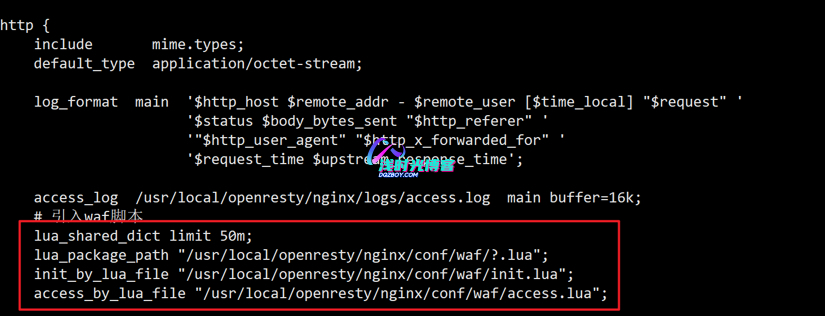
在 nginx.conf 的 http 段引入 lua 脚本;WAF 日志默认写到 /tmp/日期_waf.log:
[root@dqzboy ~]# vim /usr/local/openresty/nginx/conf/nginx.conf
    lua_shared_dict limit 50m;
    lua_package_path "/usr/local/openresty/nginx/conf/waf/?.lua";
    init_by_lua_file "/usr/local/openresty/nginx/conf/waf/init.lua";
    access_by_lua_file "/usr/local/openresty/nginx/conf/waf/access.lua";
给 lua 库文件做软链接:
[root@dqzboy ~]# ln -s /usr/local/openresty/lualib/resty/ /usr/local/openresty/nginx/conf/waf/resty检查配置并重载:
[root@dqzboy ~]# /usr/local/openresty/nginx/sbin/nginx -t
[root@dqzboy ~]# /usr/local/openresty/nginx/sbin/nginx -s reload
6. 验证
拿 url 规则文件里定义的拦截路径试探,例如请求 https://www.xxxx.com/.inc,被 403 即生效:

报错总结
上线后日志里刷这种 warn:
[warn] 4042011#4042011: *961242 [lua] _G write guard:12: __newindex(): writing a global Lua variable ('CLIENT_IP') which may lead to race conditions between concurrent requests, so prefer the use of 'local' variables stack traceback:原因是 CLIENT_IP 变量没加 local,写到了全局表被守卫拦下。改 lib.lua,给变量加 local 即可:
function get_client_ip()
    -- 添加local 解决CLIENT_IP变量报错问题
   localCLIENT_IP = ngx.req.get_headers()["X_real_ip"]
    if CLIENT_IP == nil then
        if ngx.var.http_x_forwarded_for ~= nil then
        CLIENT_IP = string.match(ngx.var.http_x_forwarded_for, "%d+.%d+.%d+.%d+", 1);
        end
    end
    if CLIENT_IP == nil then
        CLIENT_IP  = ngx.var.remote_addr or '127.0.0.1'
    end
    if CLIENT_IP == nil then
        CLIENT_IP  = "unknown"
    end
    return CLIENT_IP
end
注意事项
项目多年未维护,规则集不会自动更新,CC 阈值和黑名单要自己盯日志调;白名单(whiteip、whiteurl)先配好再上线,否则监控探活和健康检查会被自家规则误杀。













暂无评论内容