

shc(Shell Script Compiler)把 Shell 脚本先转换成 C 代码,再编译成可执行的二进制文件,从而隐藏原始脚本的源码。项目地址:https://github.com/neurobin/shc 。
工具特点
- 保护脚本源代码:生成二进制后,别人无法直接查看或修改脚本内容;
- 加密和压缩:可选用密码加密生成的 C 代码,只有正确密码才能运行;
- 平台兼容性:产物在支持相应 Shell 解释器的系统上运行,无需额外依赖;
- 使用简单:一条
shc命令指定源文件即可生成二进制。
下载编译安装
SHC 已长时间未更新,两个已知问题:建议用 CentOS 7 安装 SHC 工具,新版本 Linux 上加密的脚本拿到低版本发行版运行会碰上 GLIBC 版本不兼容;加密后的二进制执行时可通过 ps -aux 看到脚本内容。安装过程:
[root@localhost ~]# mkdir -p /opt/soft && cd $_
[root@localhost soft]# wget https://github.com/neurobin/shc/archive/refs/tags/4.0.3.tar.gz

# 构建和安装软件
[root@localhost soft]# tar -xf 4.0.3.tar.gz
[root@localhost soft]# cd shc-4.0.3/
[root@localhost shc-4.0.3]# mkdir -p /usr/local/man/man1/   # 创建目录这一步这个是必须的,没这个目录会报错

[root@localhost shc-4.0.3]# ./configure
[root@localhost shc-4.0.3]# make

# 安装
[root@localhost shc-4.0.3]# make install
加密脚本
脚本文件里必须写上魔法字符 #!/bin/bash,不然无法加密。语法:
shc [-e date] [-m addr] [-i iopt] [-x cmnd] [-l lopt] [-o outfile] [-rvDSUHCABh] -f script常用参数:
| 参数 | 参数说明 |
-e <日期> |
设置脚本的过期日期(格式:dd/mm/yyyy)。过期后运行脚本会显示提示信息。 |
-m <消息> |
设置脚本过期时显示的消息(默认:”Please contact your provider”)。 |
-f <脚本文件> |
指定要编译的 Shell 脚本文件。 |
-o <输出文件> |
指定编译后的输出文件名。 |
-r |
放宽安全性,生成可再分发的二进制文件。 |
-v |
显示详细的编译过程。 |
-U |
使二进制文件不可追踪(默认关闭)。 |
-H |
启用额外的安全保护(硬化)。 |
-B |
为 BusyBox 编译脚本。 |
实际演练一遍:
[root@localhost ~]# shc -h
shc Version 4.0.3, Generic Shell Script Compiler

[root@localhost ~]# cat > shc_srcipt.sh <<EOF
> #!/bin/bash
> echo "hello shell"
> EOF
[root@localhost ~]# bash shc_srcipt.sh
hello shell

# 对上面的shell脚本进行加密
[root@localhost ~]# shc -v -f shc_script.sh -H -U -o shc_script
shc shll=bash
shc [-i]=-c
shc [-x]=exec '%s' "$@"
shc [-l]=
shc opts=
shc: cc   shc_script.sh.x.c -o shc_script
shc: strip shc_script
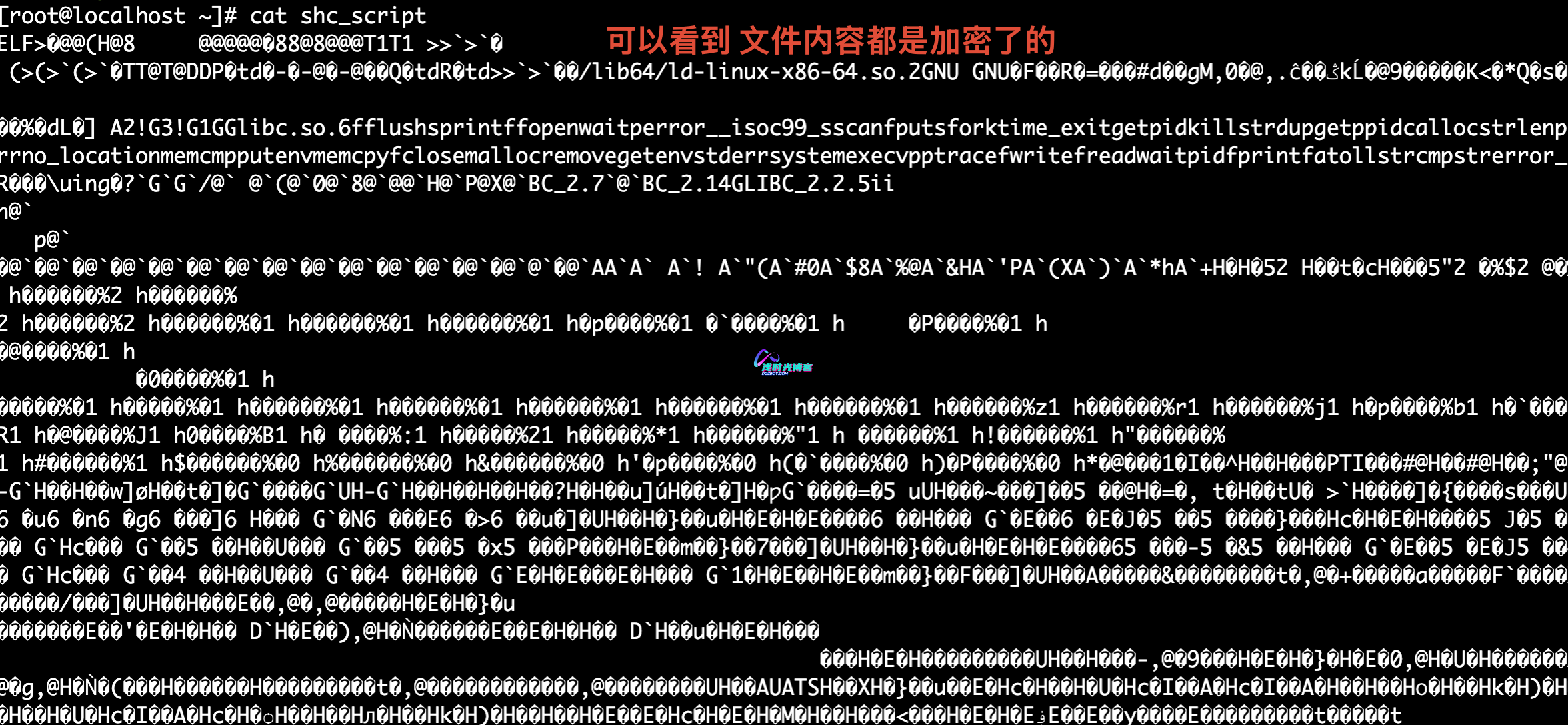
shc: chmod ug=rwx,o=rx shc_script执行后目录里多出两个文件:shc_script.sh.x.c 是中间 C 源文件,可以直接删除;shc_script 就是加密后的可执行文件,可随意改名、不用重新赋权(shc 处理过程中已经赋权)。用 cat shc_script 查看,只能看到乱码的二进制内容:
%
%
执行时注意,bash xxx 或 sh xxx 的方式是无法运行加密脚本的,直接执行二进制:
[root@localhost ~]# ./shc_script
hello shell
常用组合示例
shc -f script.sh -o compiled_script                 # 基本编译
shc -f script.sh -o compiled_script -e 15/02/2020    # 设置过期日期
shc -f script.sh -o compiled_script -e 15/02/2020 -m "This script has expired."   # 自定义过期消息
shc -f script.sh -o compiled_script -v               # 显示详细编译过程
shc -f script.sh -o compiled_script -r               # 生成可再分发的二进制
shc -f script.sh -H -U -o compiled_script            # 启用硬化+不可追踪
局限说明
shc 只是把源码藏进可执行文件里,编译产物仍然需要 Shell 解释器运行,执行时会创建新进程,所以通过 ps -ef 能看到进程及参数,包括二进制名称和路径,脚本内容也可能被顺带看到。它的定位是防住普通用户轻易查看修改,不是绝对安全;需要更高级别的保护,应该考虑加密存储、访问控制、数字签名这些手段。
© 版权声明
文章版权归作者所有,未经允许请勿转载。
THE END









暂无评论内容